The Folunio extension
Logs the chapter you're reading to your shelf without leaving the tab. You name the work once; from then on it recognises the site on its own.
Install
Install the extension from the Chrome Web Store.
Install from the Chrome Web StoreSign in to Folunio on this site. The extension uses your browser session — it never asks for your password or stores your credentials.
Open a chapter on any reading site and click the Folunio icon in the browser bar.
How it works
The popup lists the series on your shelf, each with the chapter you stopped at — completed ones stay out, and the filter field is there for large shelves.
The chapter comes from the page title. When it can't be sure, the field stays empty instead of guessing, and you type it in. Whether your progress moves forward is decided by the server, not the extension.
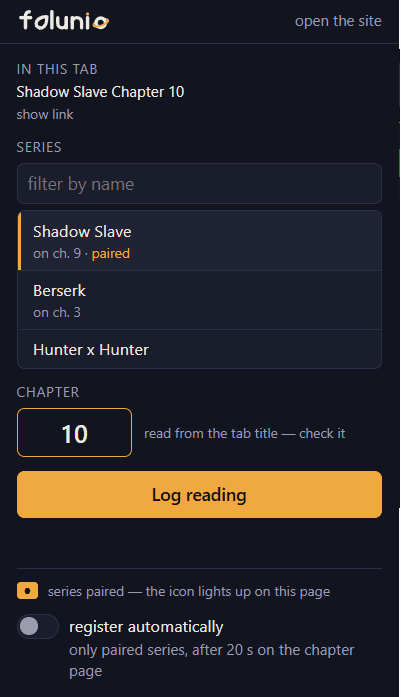
The mark on the icon
When you log a chapter, the extension remembers that this site is that work. Next time the icon tells you before you even click.


The popup repeats the same signal in words, at the bottom of the window — including when the page isn't paired yet, which is exactly the case where the icon shows nothing.
Automatic logging
With the switch on, the extension logs the chapter without a click. It only does that when all three hold:
- you paired the work with that site once, by hand;
- you stayed twenty seconds on the chapter page;
- the tab is still in front, in the window you're using — switching tabs cancels it.
The green check on the icon is how you know it saved. If something gets logged by accident, the reading reset lives on the work's page.
Privacy and permissions
The extension reads the address and title of your tabs. That's where the work and the chapter come from, and it's what allows the mark on the icon before you click. It injects no script into any site and does not read page content.
Chrome presents this permission as “Read your browsing history”. That's an honest description of what it allows, and you deserve to read it here rather than discover it in the browser dialog.
Your reading progress and the site you read on are private to you. They never show to other people, never count towards anything public and never become a ranking.
Not working?
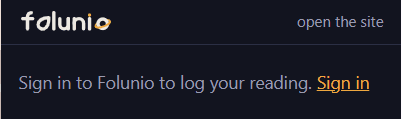
The popup asks you to sign in
The extension couldn't find your session. Sign in to Folunio on this site, in a normal tab, then open the popup again.
The chapter field came up empty
That page's title doesn't state the chapter in a way we can be sure about. The box stays dashed and empty instead of guessing: type the number and log it.
The work isn't in the list
The popup only shows what's on your shelf, and it can't add works yet. Add it from the catalogue.